Install Whyfire
One Ubuntu server runs the appliance. Each server you want watched gets one command. Plan on about 30 minutes from a fresh VM to your first investigated incident.
Early access. Whyfire is with design partners. We send you the install package; join the waitlist or email hello@whyfire.io. If anything here doesn't match what you see, tell us: that's exactly the feedback we need.
What you'll have in about 30 minutes
- The appliance on your own server, with HTTPS and a sign-in
- Your servers' metrics and logs arriving, with starter alerts for a server that stops answering or runs low on disk
- One incident card per fire in Teams or Slack, with its point of origin
- Free for up to 10 servers; a licence key raises the limit
Just trying it? Steps 1–5 are enough. Running it for real? Add 6–10: the AI write-up, silences that follow tickets, your own domain, a licence and backups.
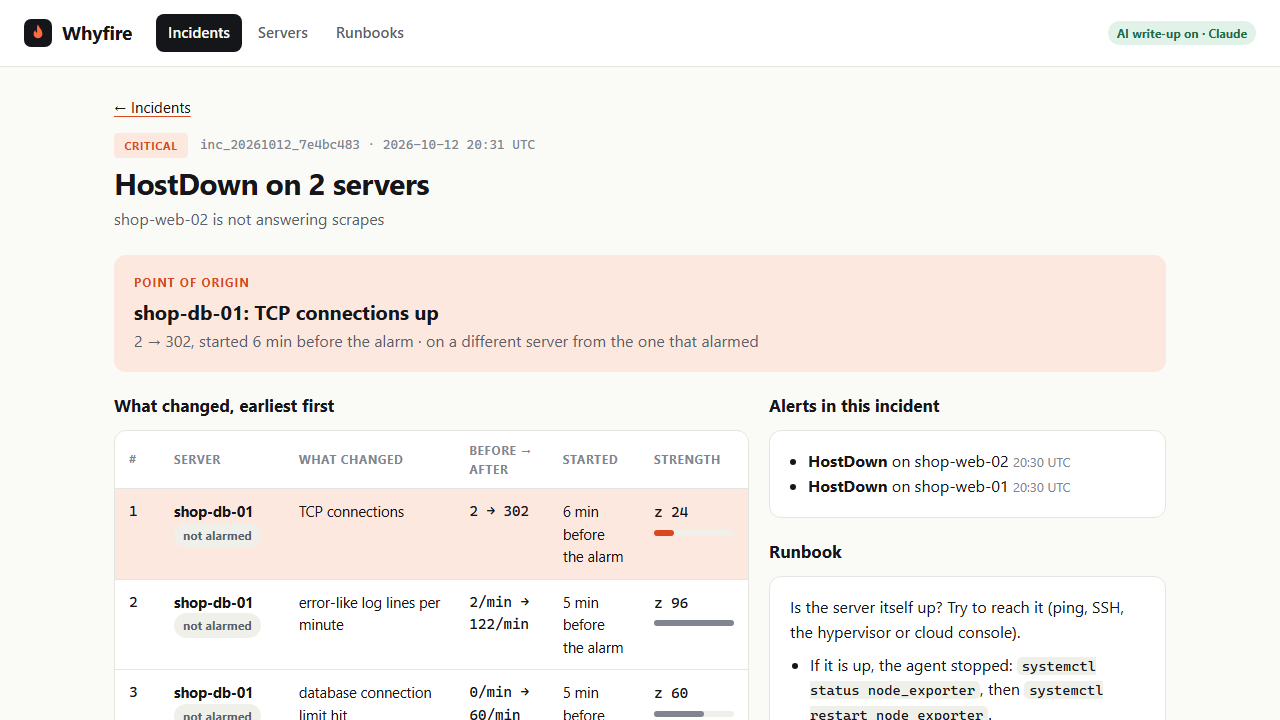 An incident from the live demo →
How it fits together
- Prometheus metrics and alert rules
- Loki logs
- Alertmanager grouping and silences
- Investigator point of origin and cards
- Web screens over HTTPS
At install, each server fetches node_exporter from its official GitHub release and checks its checksum. After that, your servers send data only to the appliance. The appliance reaches out only to what you set up (chat, the AI write-up, your ticket system and, with your own domain, Let's Encrypt), plus the public container images it runs on when you install or upgrade.
01Requirements
The appliance (one server or VM)
- Ubuntu 22.04 or 24.04, 64-bit, with root access.
- Starting size: 2 vCPU, 4 GB memory, 40 GB disk. The whole appliance uses about 300 MB of memory watching four servers in our lab; disk grows with how many servers you watch and how much they log (30 days of metrics and logs are kept). We'll firm up sizing with design partners.
- Docker and Docker Compose. The package installs them from Ubuntu if they're missing.
Network
| Port | From | To | For |
|---|---|---|---|
| 443/tcp, 80/tcp | your browser | appliance | the Whyfire screens (HTTPS; 80 only redirects) |
| 8088/tcp | each watched server | appliance | enrolment, once per server |
| 514/tcp | each watched server | appliance | logs |
| 9100/tcp | appliance | each watched server | metrics |
Everything else on the appliance (its metrics and log stores, alert routing) listens only on the appliance itself.
Servers you want watched
- Linux with systemd, x86-64 or ARM64, with
curl. Tested on Ubuntu; Debian and RHEL-family servers should work the same way, so tell us if one doesn't. rsyslogfor logs (installed by default on Ubuntu and Debian). Without it you still get metrics.
02Install the appliance
Copy the package we sent you to the server, then:
sudo apt install ./whyfire_0.3.0_all.debThis installs Docker if needed, sets up Whyfire under /opt/whyfire, starts it, and prints three things: the address of the screens, where the admin password is, and the command for adding servers.
No .deb? Use the release archive
tar -xzf whyfire-0.3.0.tar.gz
sudo bash whyfire-0.3.0/installer/install.sh
Check everything is running:
sudo whyfire status03Sign in
Open https://<your-server> in a browser. The appliance makes its own certificate, so your browser warns the first time; accept it, or use your own domain for a trusted one.
The username is admin. Every appliance gets its own random password at install:
sudo grep WHYFIRE_ADMIN_PASSWORD /opt/whyfire/appliance/.envChange it after you sign in (at least 12 characters; nothing is shown as you type). The same command adds more people:
sudo whyfire user set admin
sudo whyfire user set alex04Add your servers
Print the command for adding a server:
sudo whyfire agent-commandRun what it prints on each server you want watched. It looks like this:
curl -fsSL http://<appliance>:8088/agent.sh | sudo bash -s -- --token <token>It installs the metrics agent, sends the server's logs to the appliance, and enrols it. The server shows under Servers within a minute. Running it again on the same server is harmless.
Retiring a server: sudo whyfire remove-server <name>. If a new server later reuses its address, Whyfire treats it as the new server.
05Incident cards in Teams or Slack
Settings live in /opt/whyfire/appliance/.env. Set where cards go:
| Chat | Settings | Where the URL comes from |
|---|---|---|
| Microsoft Teams | NOTIFY_KIND=teamsNOTIFY_URL=… | In the channel: Workflows → "Post to a channel when a webhook request is received" → copy the URL |
| Slack | NOTIFY_KIND=slackNOTIFY_URL=… | A Slack app with an Incoming Webhook for the channel |
| Anything else | NOTIFY_KIND=webhookNOTIFY_URL=… | Any URL that accepts a JSON POST |
After changing .env, apply it:
cd /opt/whyfire/appliance && sudo docker compose --env-file .env up -dEach card carries Origin was right / wrong buttons. On-call's answers are how Whyfire measures how often it finds the cause; the score shows on the Incidents screen.
06AI write-up (optional)
Whyfire finds the point of origin with statistics; no AI is needed for that. With your own Anthropic API key, Claude also writes each incident up (cause, evidence, next step), checking the evidence against your metrics and logs with read-only queries.
# in /opt/whyfire/appliance/.env
ANTHROPIC_API_KEY=sk-ant-…
WHYFIRE_MODEL=claude-opus-5-5
Apply it as in step 5. Each incident page shows what its write-up cost. Limits stop surprises: at most 100 AI runs a day and 2 at once by default (MAX_PER_DAY, MAX_CONCURRENT); past a limit, the card still goes out with the ranked causes.
07Silences follow tickets (optional)
Silence an alert in Alertmanager with a ticket in the comment (for example OPS-123 disk swap booked) and Whyfire keeps the silence going while the ticket is open, then lifts it when the ticket closes, so the alert comes back if the fix didn't hold. A silence without a ticket is never touched.
| Ticket system | Settings |
|---|---|
| Jira Cloud | TICKETS_KIND=jira, TICKETS_URL=https://acme.atlassian.net, TICKETS_USER=your email, TICKETS_TOKEN=an API token |
| GitHub Issues | TICKETS_KIND=github, GITHUB_REPO=owner/repo, TICKETS_TOKEN=a read-only token |
| Azure DevOps | TICKETS_KIND=ado, TICKETS_URL=https://dev.azure.com/org/project, TICKETS_TOKEN=a PAT with Work items: read |
Whyfire also remembers every silence, so an incident shows when its alert was silenced before and whether that ticket is now closed.
08Your own domain (trusted HTTPS)
Point a DNS name at the appliance, make sure ports 80 and 443 reach it, then:
# in /opt/whyfire/appliance/.env
WHYFIRE_SITE=whyfire.example.com
WHYFIRE_TLS=you@example.com
PUBLIC_URL=https://whyfire.example.com
Apply it as in step 5. The appliance fetches and renews a certificate itself.
09Licence
Without a licence key, Whyfire watches up to 10 servers, free. A licence raises the limit. Keys work offline, so they suit sites with no internet access too.
sudo cp licence.key /opt/whyfire/appliance/licence/licence.keyIt applies straight away; sudo whyfire status shows the limit. Going over the limit only stops new servers being added: servers already watched are never dropped.
10Running it
| Command | What it does |
|---|---|
sudo whyfire status | services, servers, licence, anything not answering |
sudo whyfire logs [service] | recent logs, e.g. investigator |
sudo whyfire backup | settings, servers, incidents, users and silences to a file in /var/backups/whyfire (it contains secrets: keep it safe) |
sudo whyfire upgrade <release> | backs up, then installs a new release, keeping your data |
sudo whyfire support-bundle | a diagnostics file to send us, with passwords and keys removed |
Uninstall
sudo apt remove whyfireThis stops Whyfire and keeps its data. On the watched servers, the agent is a node_exporter service and the file /etc/rsyslog.d/90-whyfire.conf; remove those to undo it.
Whyfire is built on open-source software (Prometheus, Alertmanager, Loki and others). Each component, its version and licence are listed in /usr/share/doc/whyfire/THIRD-PARTY-NOTICES.md on the appliance.